Introduction
Planning to watch a movie at TOHO Cinemas during your trip to Japan?
Don’t worry if you don’t speak Japanese. Although TOHO Cinemas’ booking website is mainly in Japanese, it’s surprisingly easy to reserve tickets—even without creating an account.
In this guide, we’ll show you exactly how to book tickets, what information you’ll need, and what to expect on the day of your visit.
Quick Facts
Here’s a quick overview before we go through the booking process.
| Feature | TOHO Cinemas |
|---|---|
| Official English website | ❌ |
| English booking available | ✅ (after selecting a theater, movie, and showtime) |
| Chrome Translate works well | ✅ Excellent |
| Guest checkout | ✅ |
| Membership required | ❌ |
| Japanese phone number required | ❌ |
| International credit cards accepted | ✅ |
| Mobile ticket available | ✅ |
| Difficulty for tourists | ⭐ Easy |
Before You Start
Tip: Movie titles are often displayed in both Japanese and English, making them easy to identify even before switching to English.
Good news: During our testing, Chrome’s built-in translation worked well on the Japanese pages before the English booking option became available.
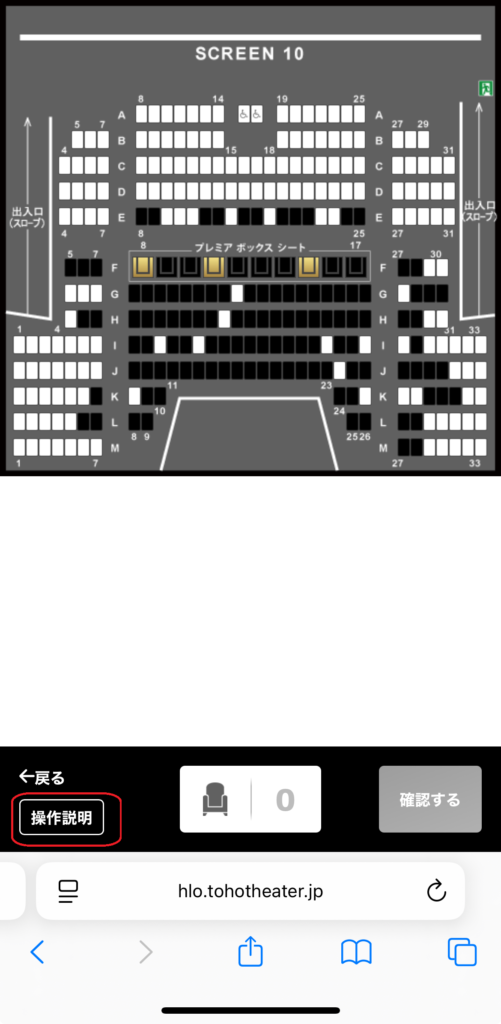
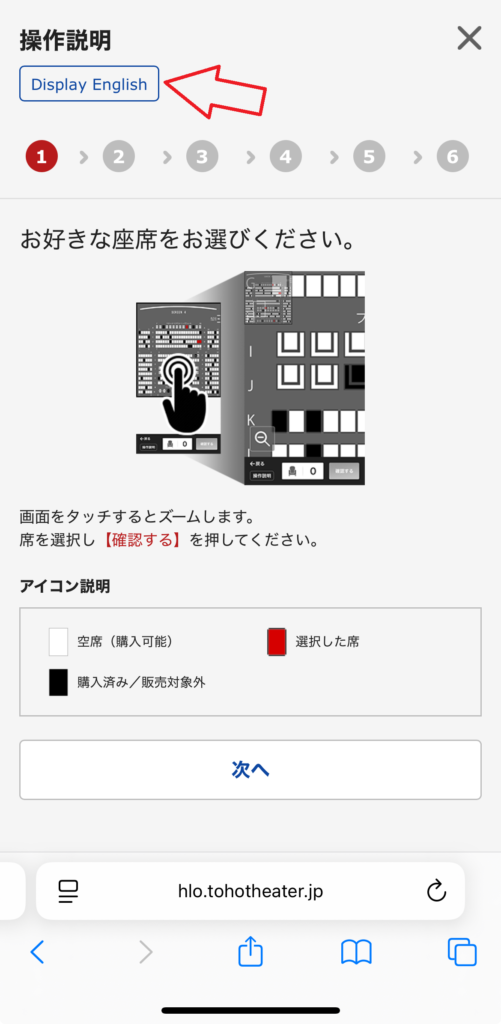
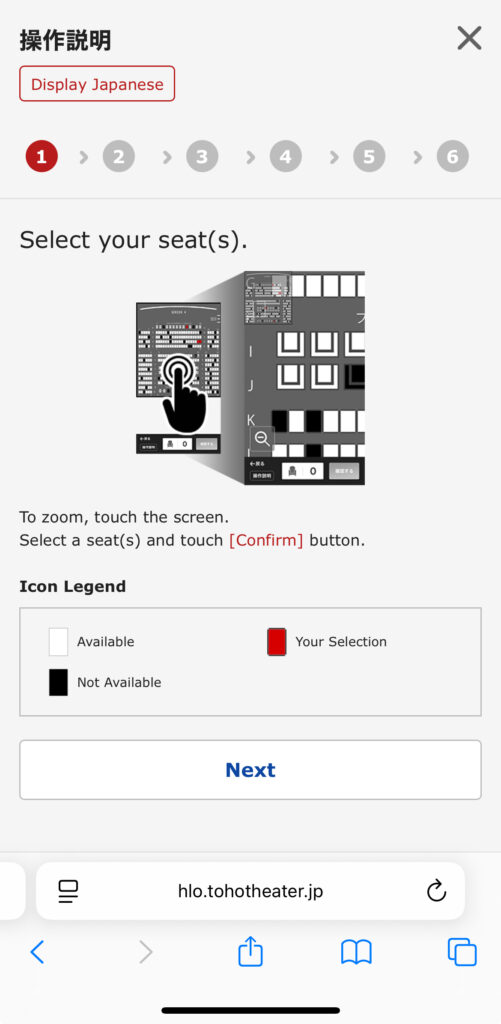
After selecting your theater, movie, and showtime, you can switch the booking screen to English by tapping “Display English.”
This means you don’t need to understand Japanese to complete your reservation.
What You’ll Need Before Booking
Before you start, make sure you have the following ready:
| What you’ll need | Notes |
|---|---|
| 📧 Email address | Your booking confirmation will be sent here. |
| 📱 Phone number | An international phone number is accepted. |
| 💳 Payment method | Major credit cards and several Japanese digital payment methods are supported. |
| 🎟️ MoviTicket (optional) | If you already have a MoviTicket, you’ll enter the number and PIN during booking. |
When Can You Book?
TOHO Cinemas starts selling tickets 2 days before the screening date.
However, TOHO Cinema Members (TOHO-ONE) can purchase tickets earlier for most movies.
| Customer | Booking Opens |
|---|---|
| Guest (No membership) | 2 days before at 12:00 AM (midnight) |
| TOHO Cinema Members | 3 days before at 9:00 PM (most movies only) |
Tip: If you’re visiting Japan as a tourist, guest checkout is usually sufficient unless you’re trying to book a very popular movie or event.
Step-by-Step Booking Guide
Follow these steps to book your movie ticket on the TOHO Cinemas website.
Step 1 — Choose Your Theater
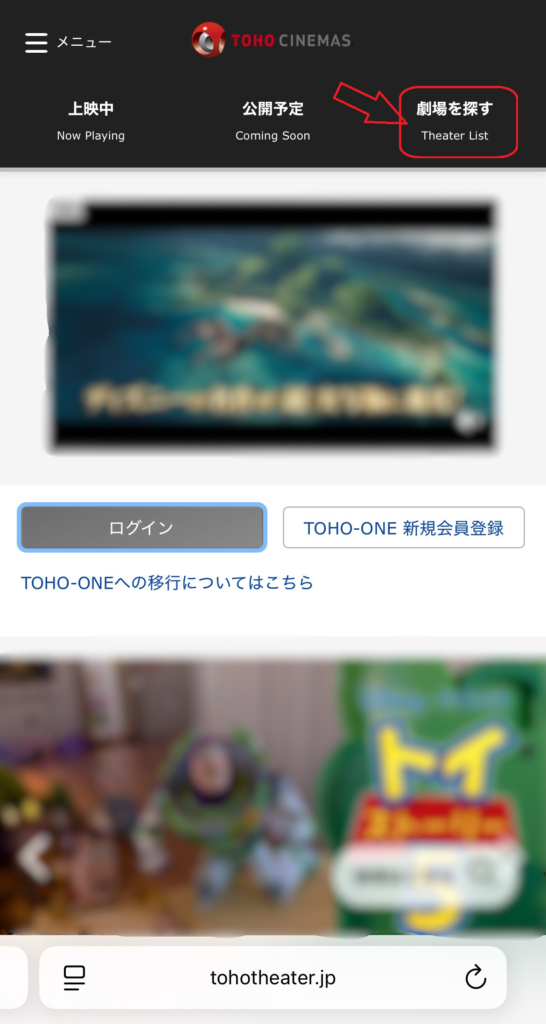
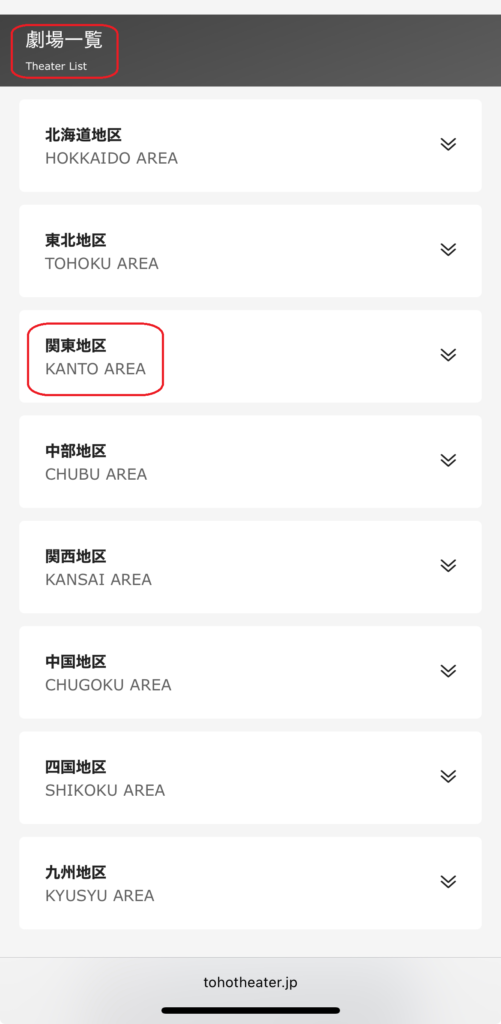
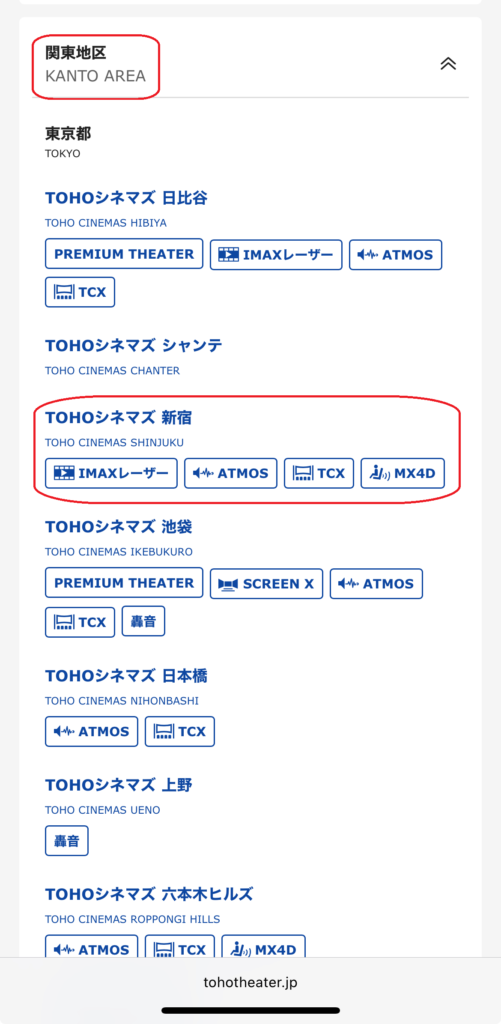
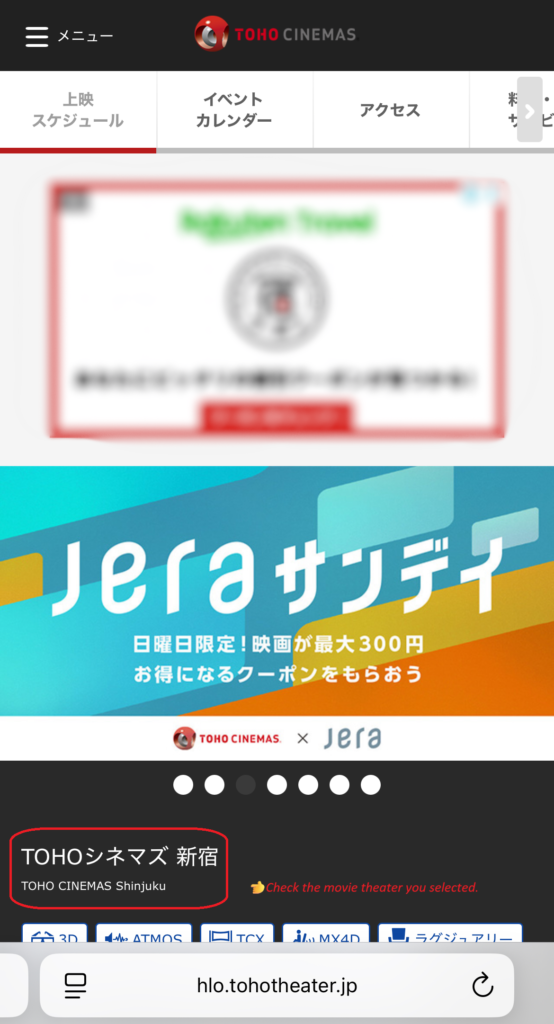
Start by selecting the TOHO Cinemas location where you’d like to watch your movie.
You can search by region or browse the full list of theaters. Theater names are displayed in both Japanese and English, making them easy to identify even if you don’t read Japanese.
Tip: If you’re traveling in Japan, double-check that you’ve selected the correct theater before continuing.
📷
Step 2 — Select Your Movie and Showtime
After choosing your theater, you’ll see the movie schedule for today’s date by default.
If you’re planning to watch a movie on another day, select your preferred date first. Then choose the movie you’d like to watch and tap your preferred showtime.
Many movie titles are displayed in both Japanese and English, making them easier for international visitors to identify.
Tip: Double-check that you’ve selected the correct version of the movie, such as 字幕版 (subtitled), 吹替版 (dubbed), or IMAX, before continuing.
Not sure what 字幕版 or 吹替版 means? Read our guide: Do Japanese Movie Theaters Have English Subtitles?
📷
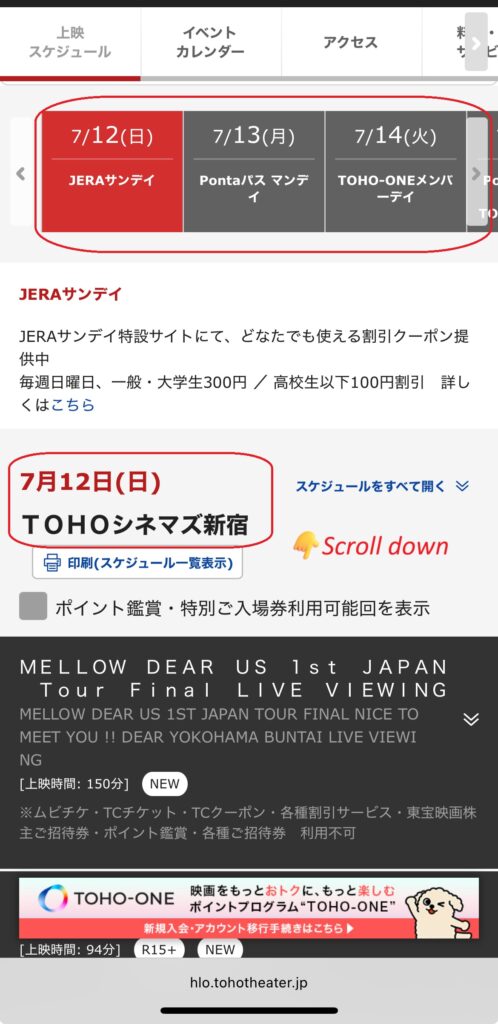
your showtime
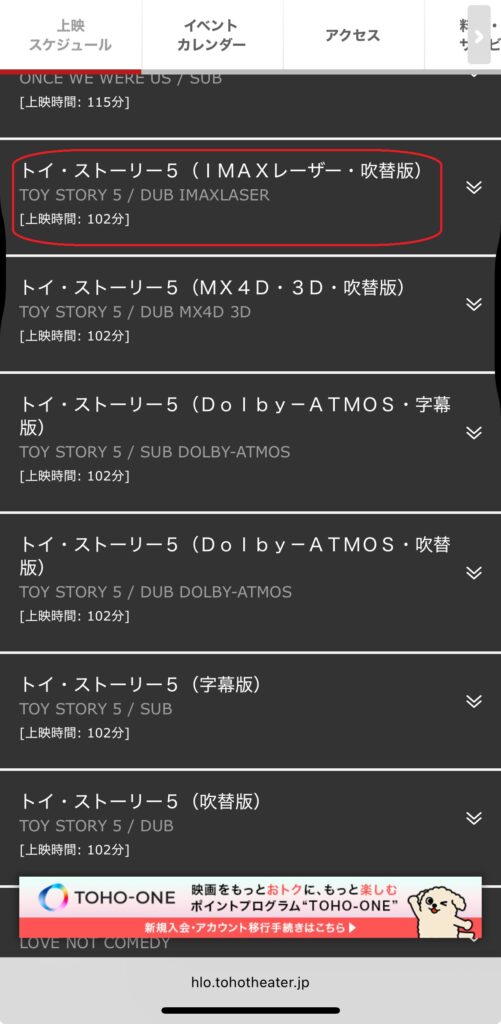
your preferred
format
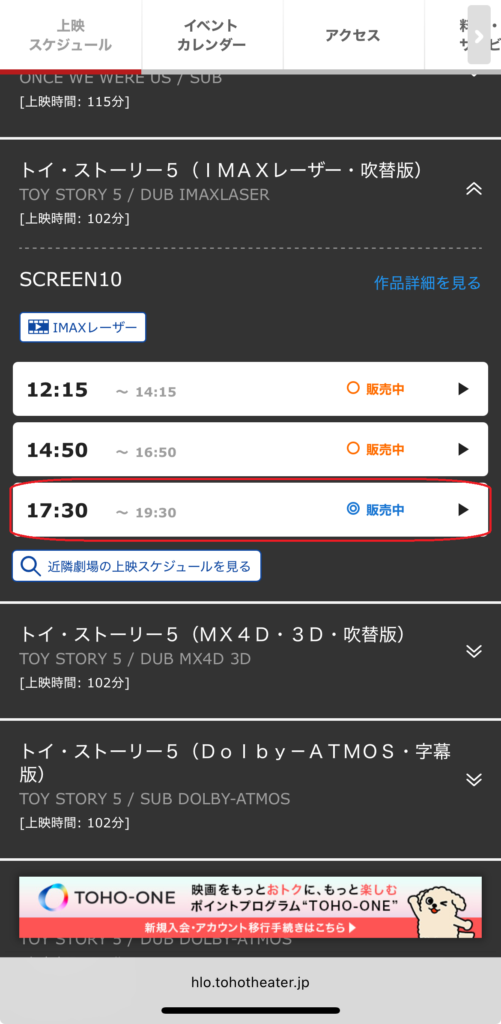
your preferred
showtime
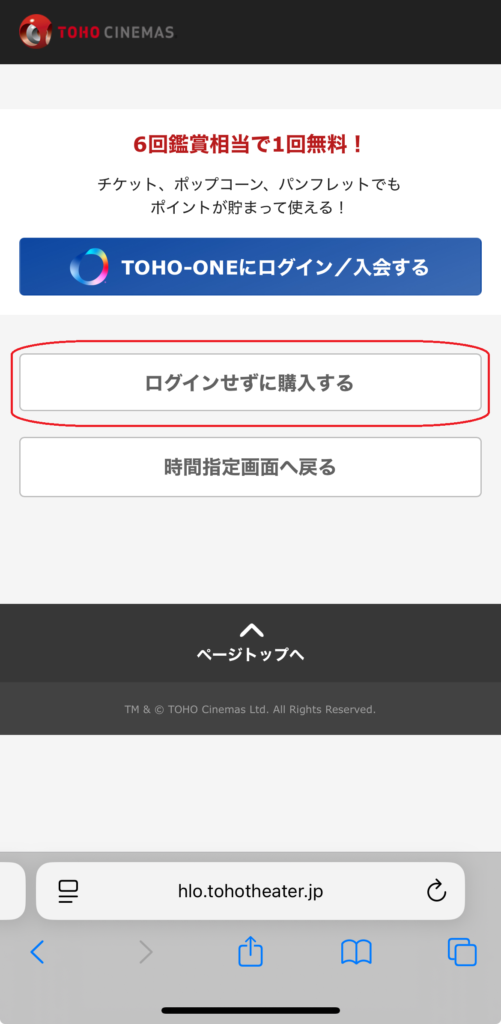
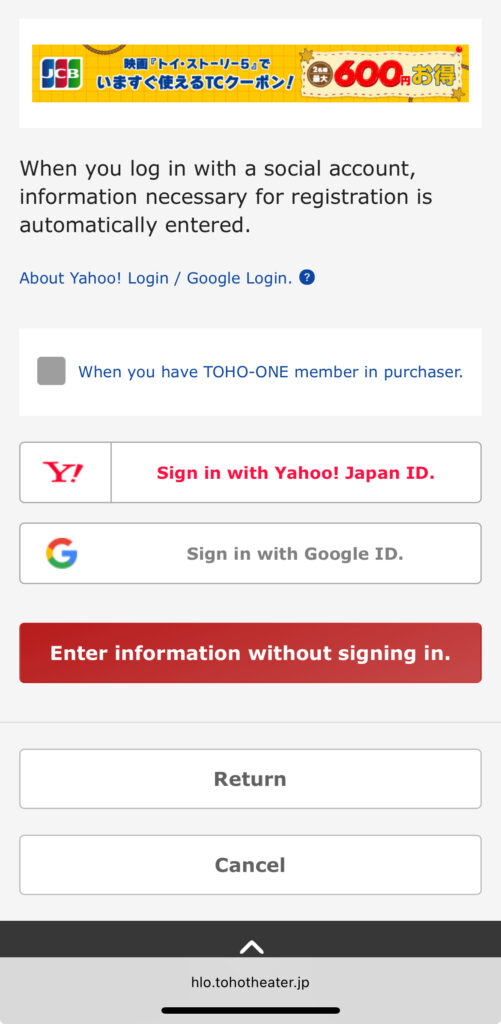
Step 3 — Continue Without Logging In
After selecting your showtime, you’ll be asked whether you’d like to sign in to a TOHO-ONE membership account.
If you don’t have an account, simply tap “Purchase without logging in.” You can complete your booking as a guest—no membership is required.
Tip: Creating a TOHO-ONE membership allows you to book tickets earlier for most movies, but it’s not necessary for most visitors or short-term travelers.
📷
button.
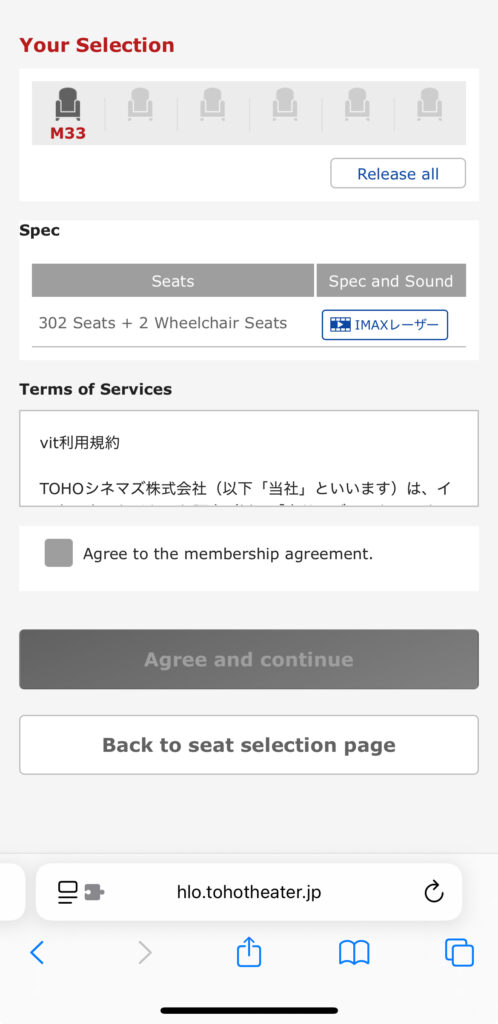
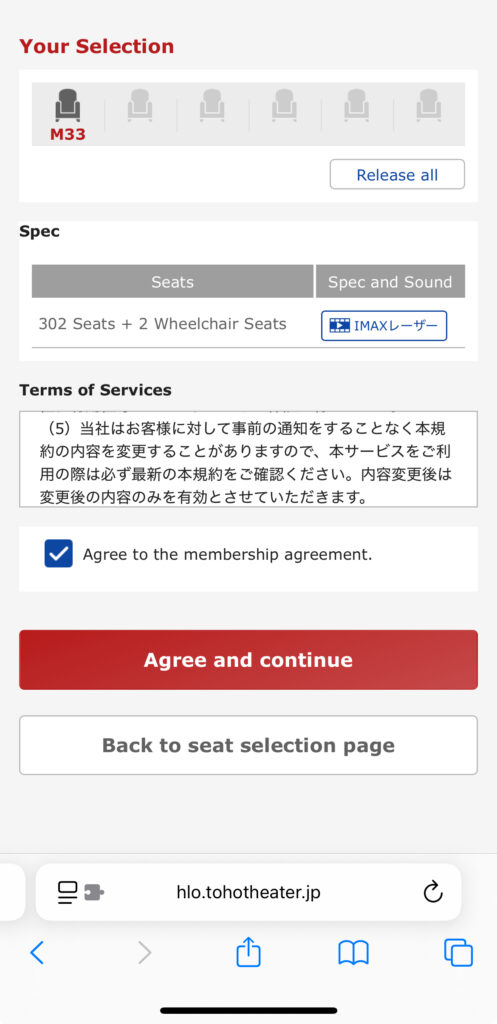
Step 4 — Select Your Seats
Choose your preferred seats from the seating map.
Available seats are shown in different colors, while unavailable seats cannot be selected. Simply tap an available seat to add it to your booking.
Tip: Premium seats or special seating areas may have an additional charge. The price will be displayed before you complete your purchase.
📷
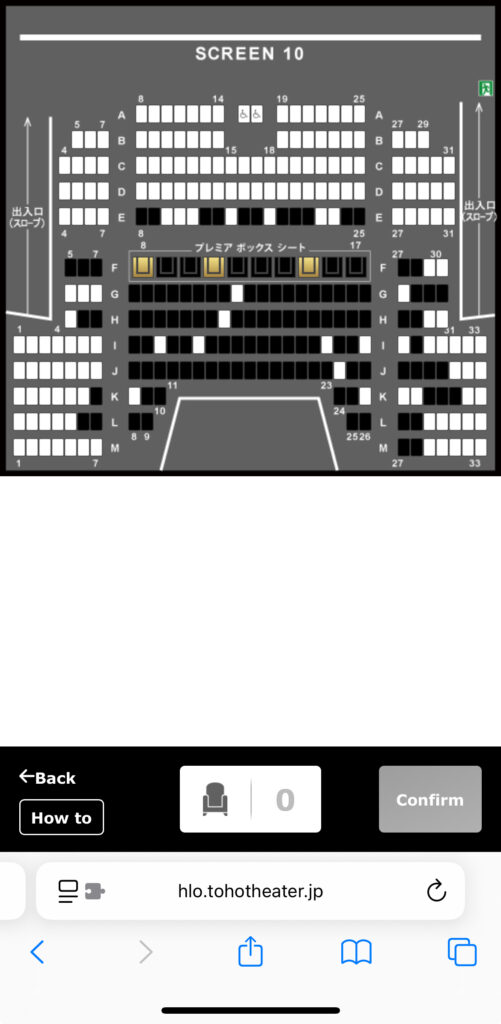
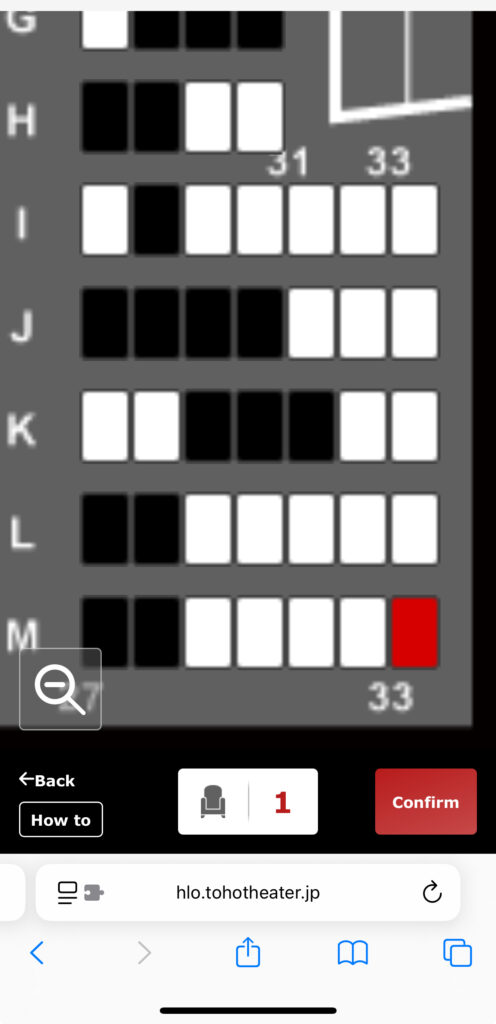
Good to know: Once you move to the next step, your selected seats remain reserved only for a limited time while you complete your booking.
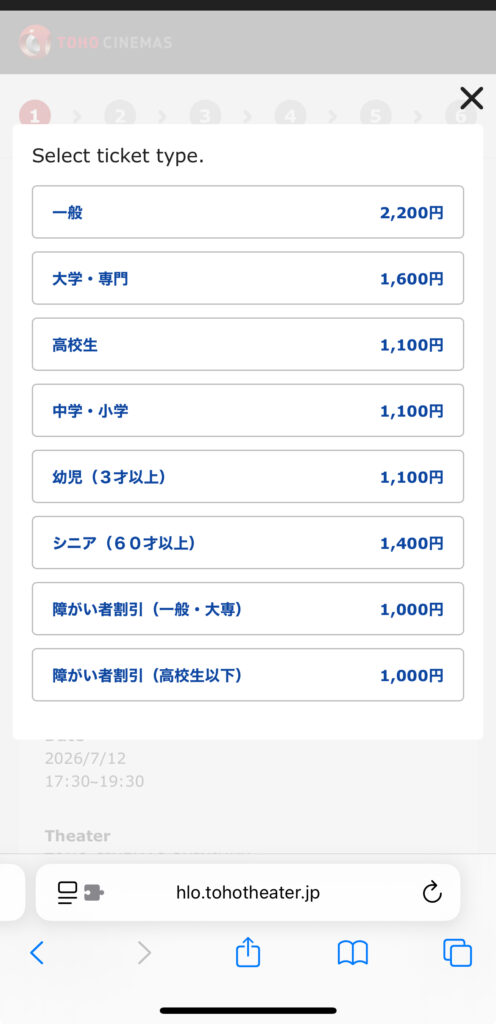
Step 5 — Choose Your Ticket Type
Select the appropriate ticket type, such as Adult, Student, or Child, depending on your eligibility.
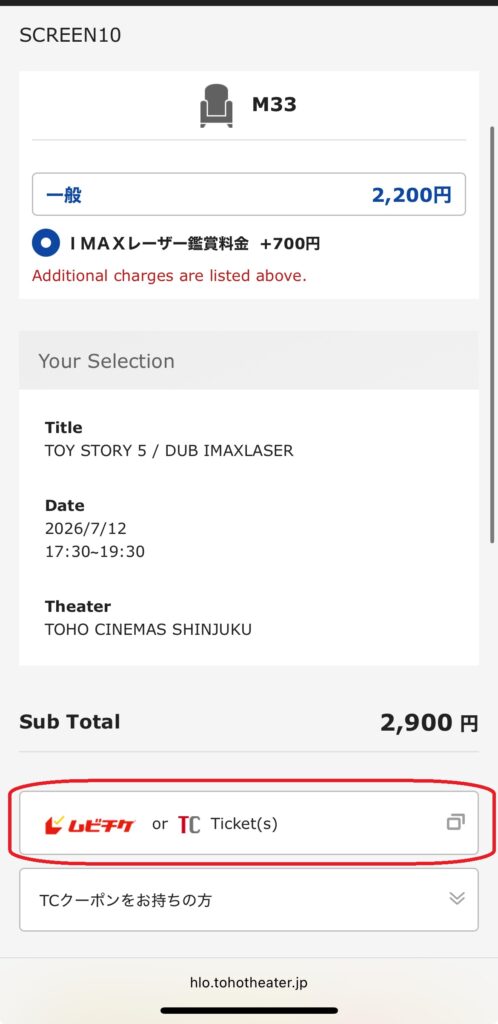
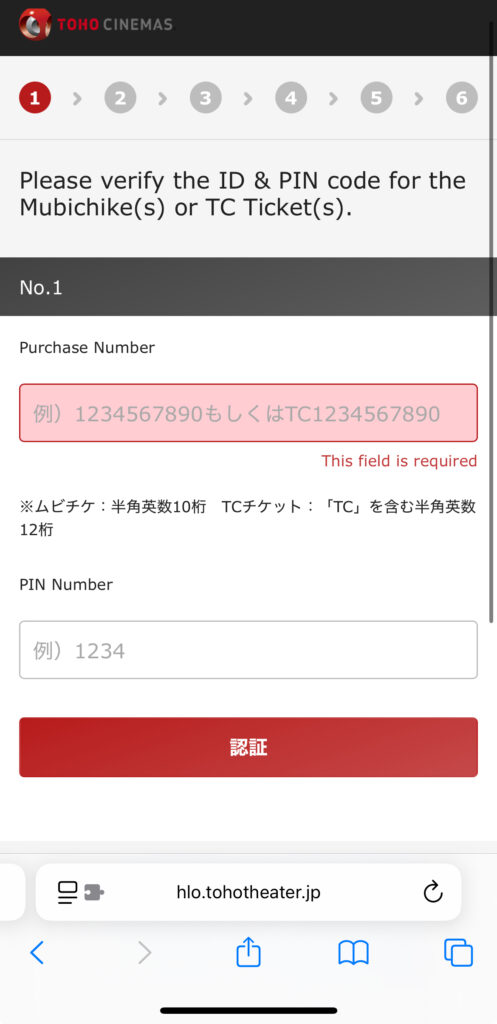
If you have a MoviTicket, tap the MoviTicket option and enter your MoviTicket number and PIN to apply it to your booking.
Tip: Watching your movie in a premium format, such as IMAX, may require an additional surcharge even if you’re using a MoviTicket.
New to MoviTicket? Learn how it works in our complete guide: What Is MoviTicket and How Does It Work?
📷
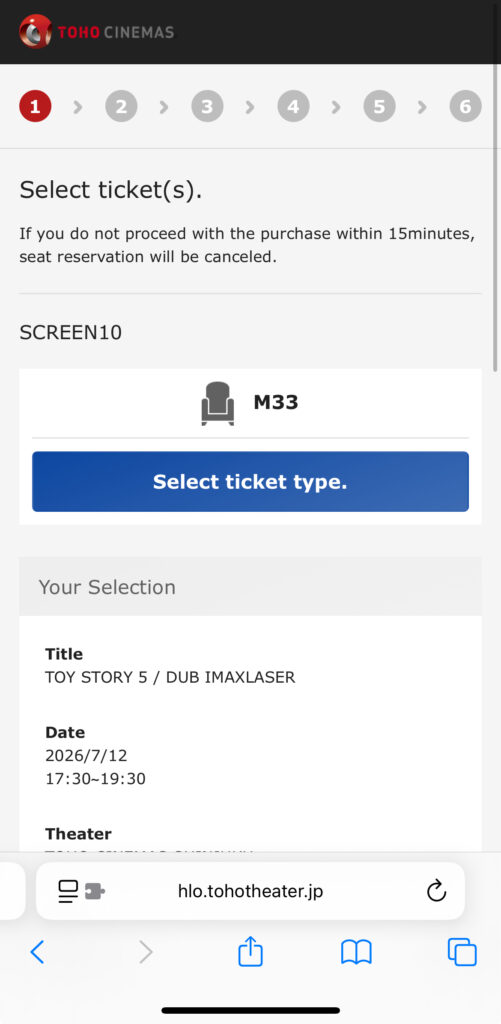
🔴Tap the blue button If you don’t have a MoviTicket
Step 6 — Complete Your Payment
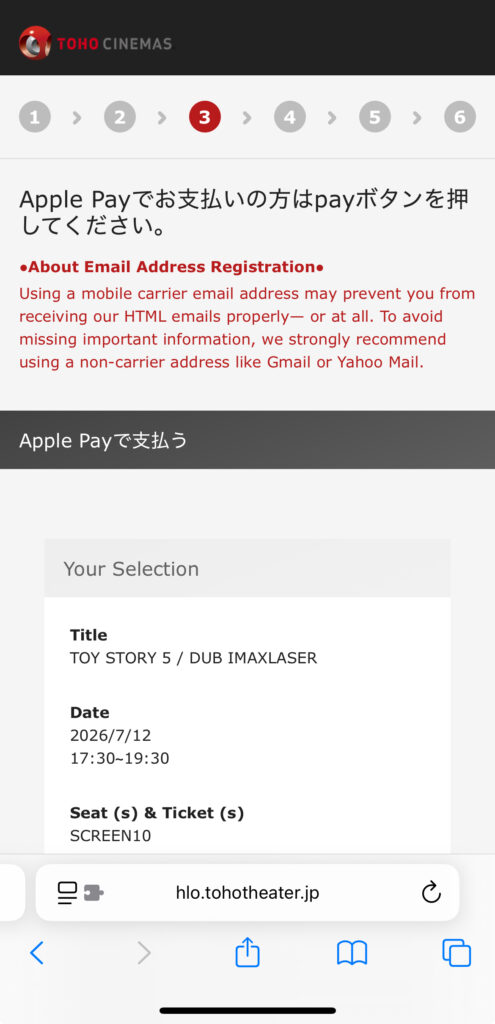
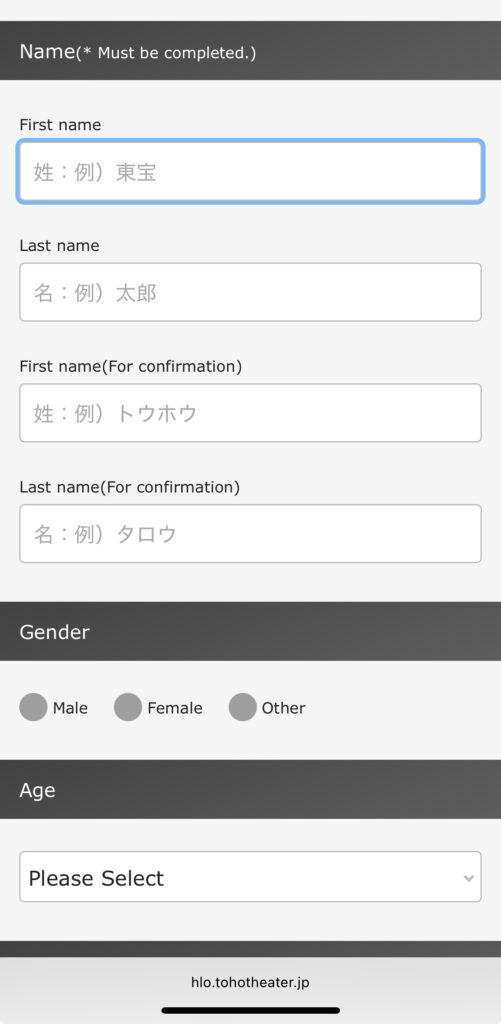
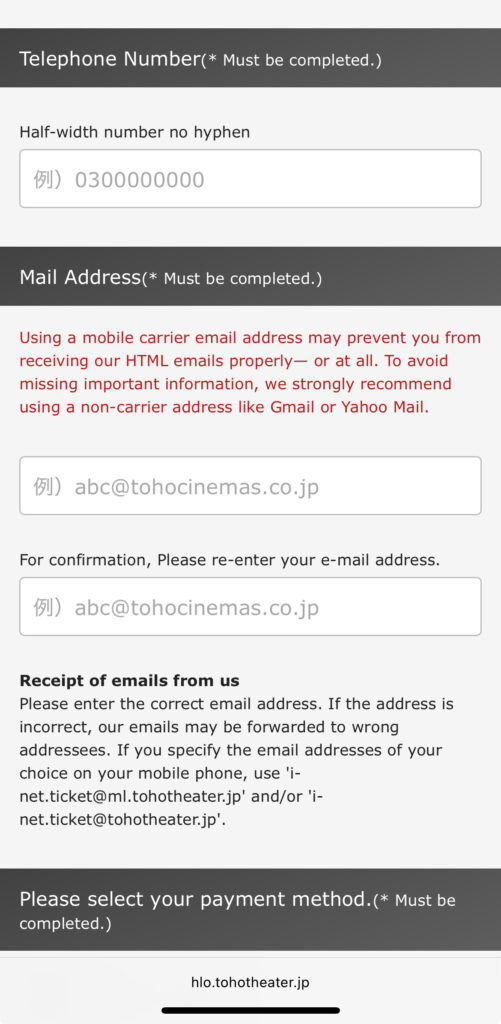
Before completing your purchase, enter your name, phone number, and email address.
TOHO Cinemas accepts international phone numbers, so you don’t need a Japanese phone number to book tickets.
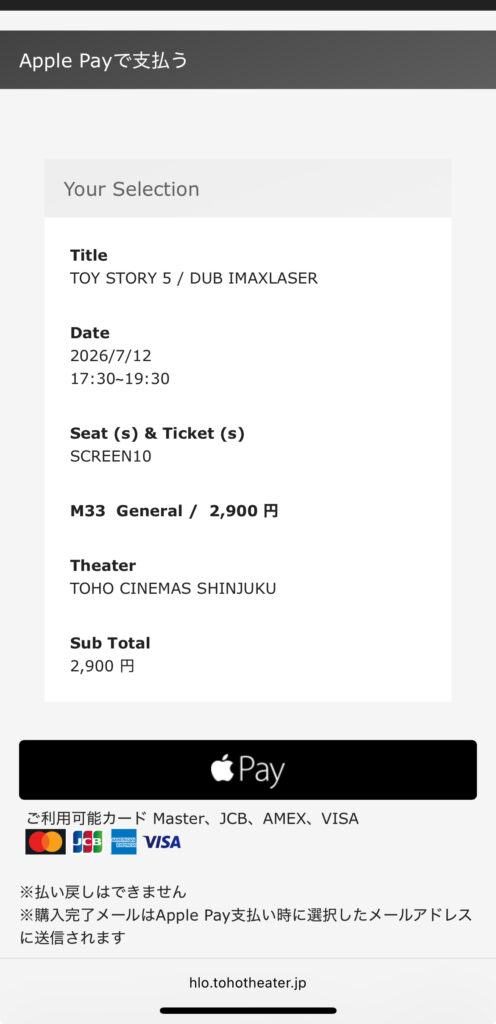
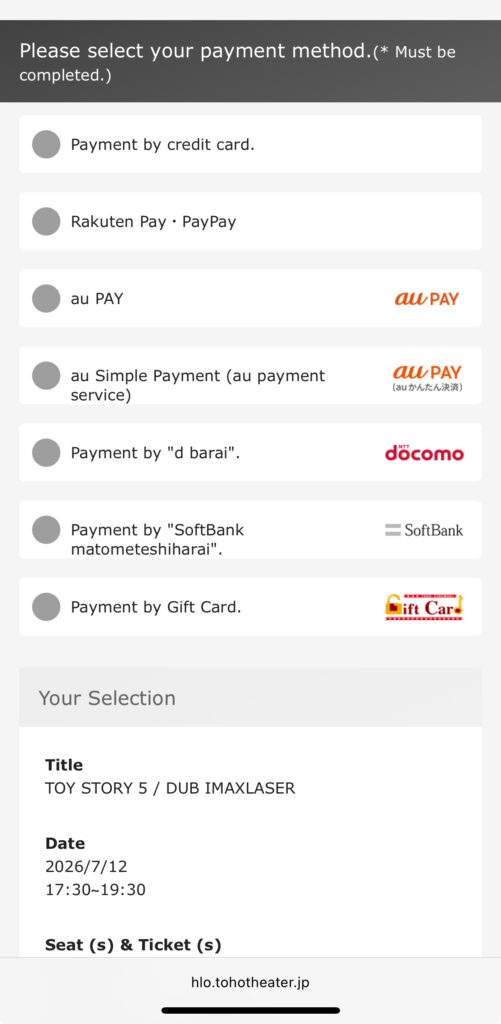
Next, choose your preferred payment method and complete your purchase. TOHO Cinemas accepts major international credit cards, including Visa, Mastercard, JCB, American Express, Several Japanese digital payment methods are also available.
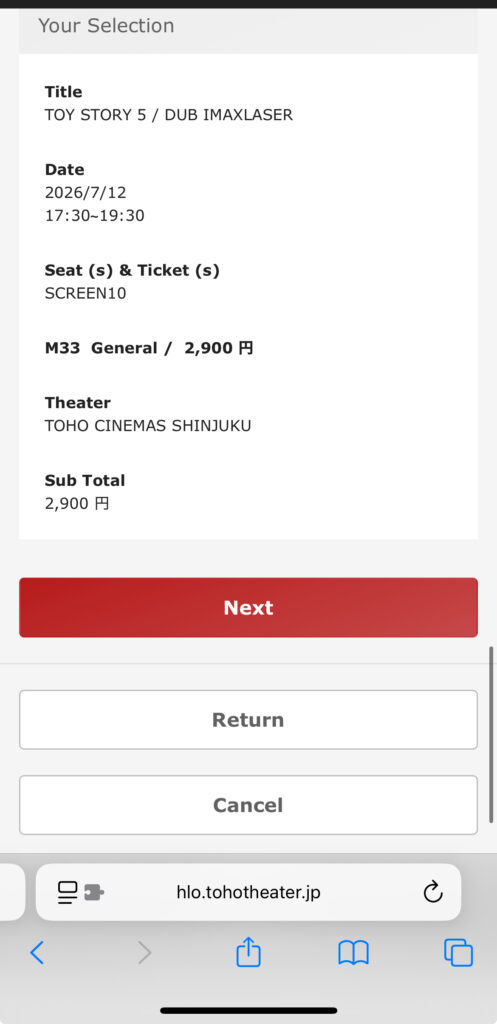
Tip: Double-check your contact information and booking details before confirming your purchase. Your booking confirmation and ticket information will be sent to your email address.
📷
How to Receive Your Ticket
Once your booking is complete, TOHO Cinemas will send a confirmation email containing both your Purchase Number and a QR code (Mobile Ticket).
You can enter the theater using either of the following methods:
Option 1: Use the Mobile Ticket
Show the QR code from the confirmation email on your smartphone at the entrance gate. You can also print the QR code if you prefer.
Option 2: Print Your Ticket at the Theater
If you’d rather have a paper ticket, use the self-service ticket machine or ticket kiosk at the theater.
Enter your Purchase Number and the phone number you used when making the reservation to print your ticket.
Tip: Using the mobile ticket is usually the quickest option, but if you’d like a paper ticket as a souvenir, you can print one at the theater before your movie.
Things to Know Before Booking
When Do Ticket Sales Open?
TOHO Cinemas starts selling tickets 2 days before the screening date at 12:00 AM (midnight).
TOHO-ONE members can usually purchase tickets earlier—3 days before the screening date from 9:00 PM for most movies.
Tip: If you’re planning to watch a popular movie, booking as soon as tickets go on sale gives you the best chance of getting good seats.
Can I Cancel or Change My Booking
No. Once your booking is complete, TOHO Cinemas does not allow cancellations, refunds, or changes to your movie, showtime, or seats unless the screening itself is cancelled.
⚠️ Important: Be sure to double-check your theater, movie, date, showtime, ticket type, and selected seats before completing your purchase.
Can I Enter After the Movie Starts?
As a general rule, TOHO Cinemas allows entry up to approximately 20 minutes after the main feature begins. However, late entry may not be permitted depending on the theater, the screening, or special events.
Tip: It’s always best to arrive early, especially if you need to print your ticket at the theater.
FAQ
Can tourists book TOHO Cinemas tickets online?
Yes. International visitors can book tickets online without creating a TOHO-ONE membership account.
Do I need a Japanese phone number?
No. TOHO Cinemas accepts international phone numbers during the booking process.
Can I pay with a foreign credit card?
Yes. TOHO Cinemas accepts major international credit cards, including Visa, Mastercard, JCB, American Express.
Can I use a MoviTicket online?
Yes. Simply select the MoviTicket option during the booking process, then enter your MoviTicket number and PIN.
Do I need to print my ticket?
No. You can enter the theater using the QR code (Mobile Ticket) sent in your confirmation email.
If you prefer a paper ticket, you can also print one at the theater using your Purchase Number and phone number.
Ready to Enjoy Your Movie?
Now that you know how to book tickets on TOHO Cinemas, you’re ready to enjoy the movie experience in Japan!
If you’re planning to visit other theater chains, check out our other booking guides and Japan movie theater tips.
Related Guides
Looking for another theater chain? Read our guide to 109 Cinemas.