Introduction
Planning to watch a movie at MOVIX or another SMT (Shochiku Multiplex Theatres) cinema during your trip to Japan?
Although the booking website is mainly in Japanese, it’s easy to reserve tickets using Chrome’s built-in translation. Once you reach the seat selection screen, you can also switch the booking process to English.
Whether you’re a tourist or a first-time visitor to a Japanese movie theater, this guide will walk you through every step of the booking process.
🎬Ready to Book?
Open the MOVIX & SMT Online Ticket Booking page in a new tab, then follow the steps below with our screenshots.
💡 You don’t need to create a membership account to book tickets.
Quick Facts
Here’s a quick overview before we go through the booking process.
| Question | Answer |
|---|---|
| Official English website is available? | ❌ No |
| Can you book entirely in English? | ✅ Yes (Chrome translation first, then the booking screen can be switched to English.) |
| Is guest checkout available? | ✅ Yes |
| Is membership required? | ❌ No |
| Can tourists use it? | ✅ Yes |
| Can overseas credit cards be used? | ⚠️ Major credit card brands are accepted, but the website does not clearly state whether overseas-issued cards are supported. |
| Is a Japanese phone number required? | ⚠️ A phone number is required. The website does not clearly state whether an international phone number can be used. |
Before You Start
| You’ll need | Notes |
|---|---|
| 📧 Email address | To receive your booking confirmation |
| 📱 Phone number | Required for your reservation |
| 💳 Payment method | Credit card or supported digital payment service |
| 🎟️ MoviTicket (optional) | If you already have a MoviTicket voucher |
Good to know: You don’t need a membership account to complete your booking.
Step-by-Step Booking Guide
Follow these steps to book your movie ticket on the MOVIX & SMT Cinemas website.
Step 1 — Choose Your Theater
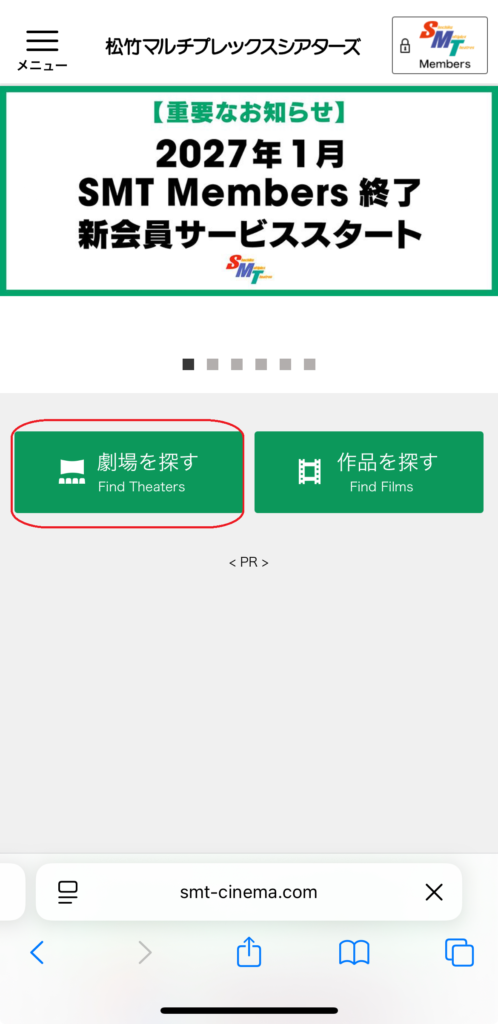
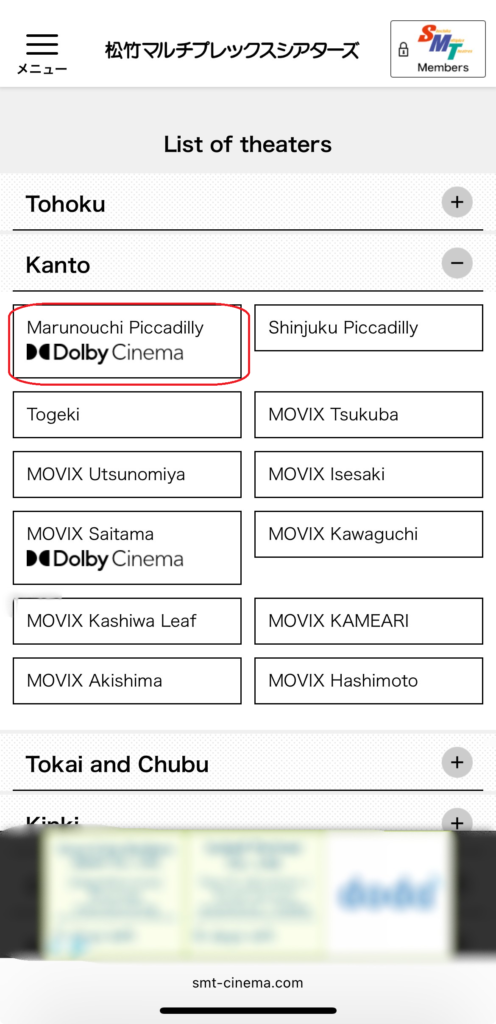
Start by selecting the MOVIX or SMT theater where you’d like to watch your movie.
You can browse the theater list by region. Theater names are displayed in both Japanese and English, making it easier to find the correct location.
Tip: If you’re visiting Japan, double-check that you’ve selected the correct theater before continuing.
📷
Step 2 — Select Your Movie and Showtime
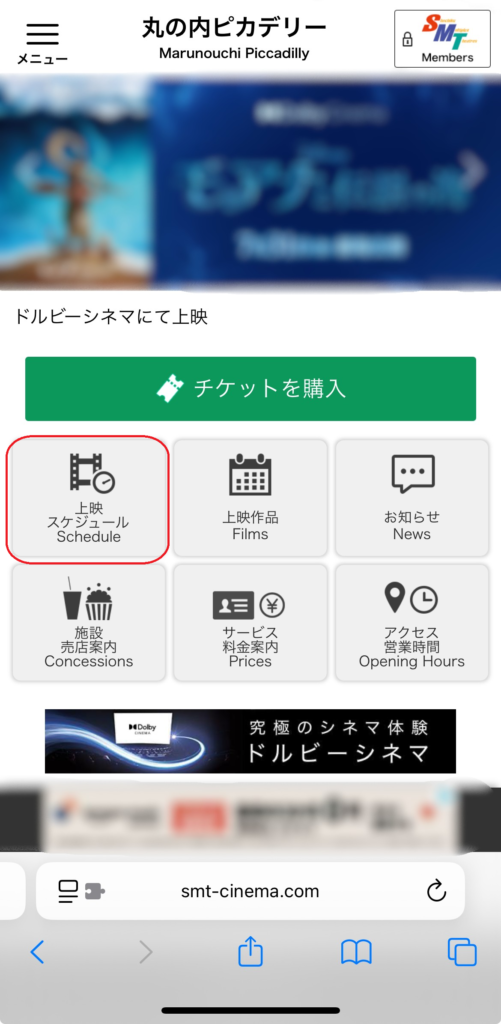
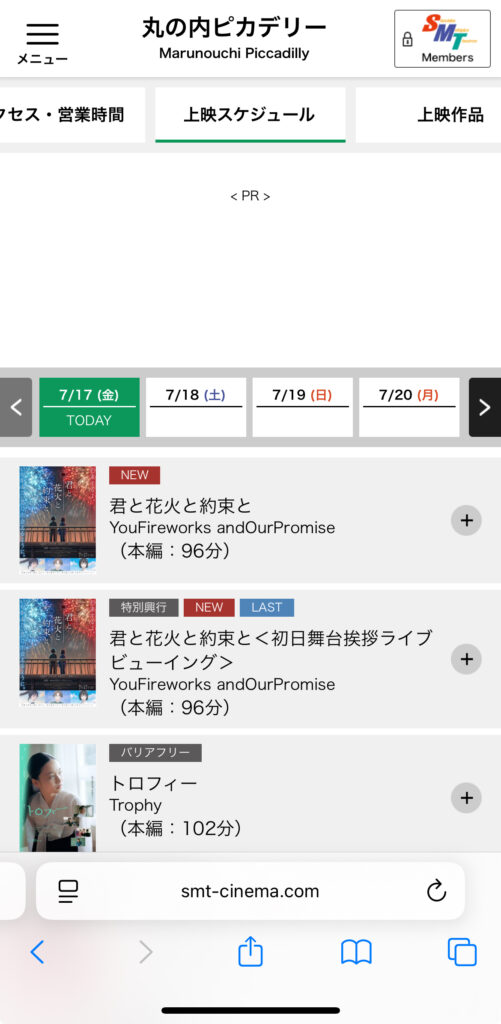
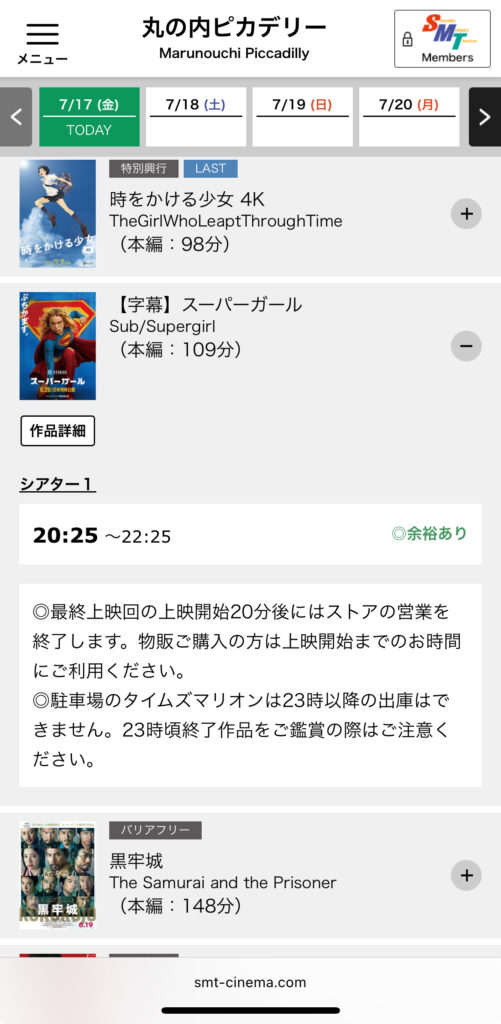
After choosing your theater, you’ll see the movie schedule.
First, select your preferred date, then choose the movie you’d like to watch. Movie titles are displayed in both Japanese and English, making them easier to identify.
Next, tap your preferred showtime to continue.
Tip: Before continuing, make sure you’ve selected the correct version of the movie, such as 字幕版 (subtitled), 吹替版 (dubbed), or IMAX.
If you’re not sure what 字幕版 or 吹替版 means, read our guide: Do Japanese Movie Theaters Have English Subtitles?
📷
and Showtime
Step 3 — Choose Your Seats
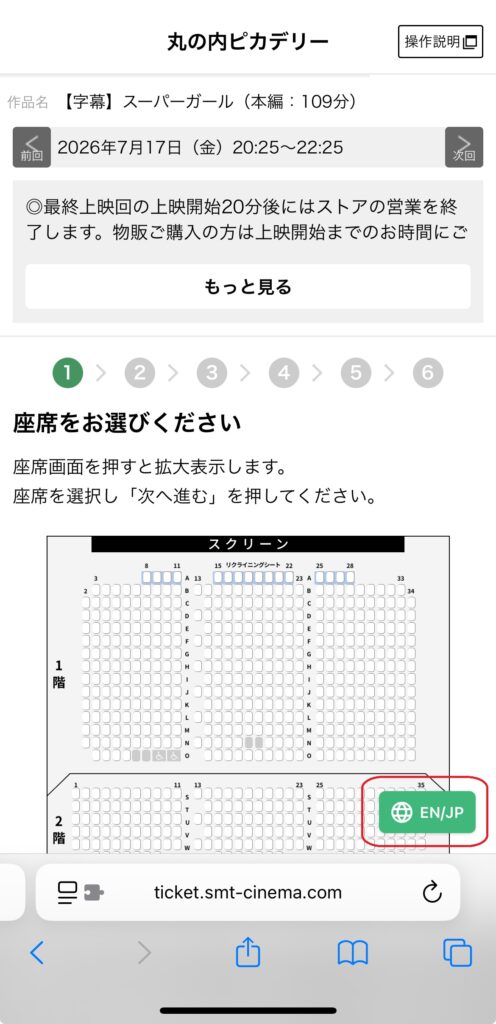
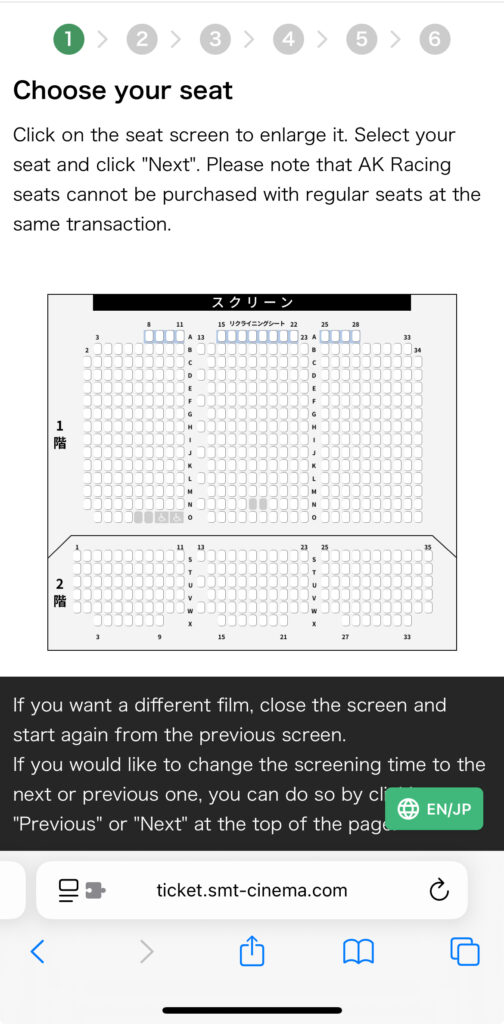
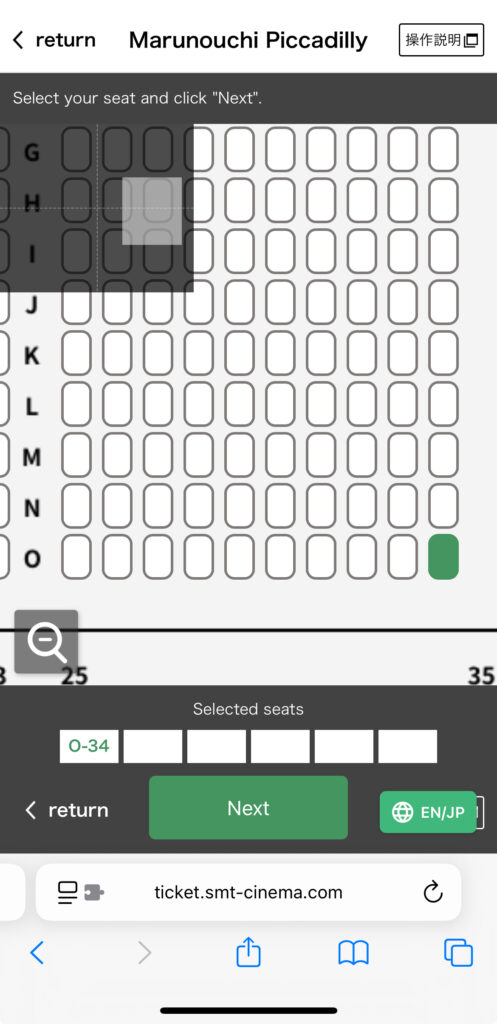
After selecting your showtime, you’ll be taken to the seat selection screen.
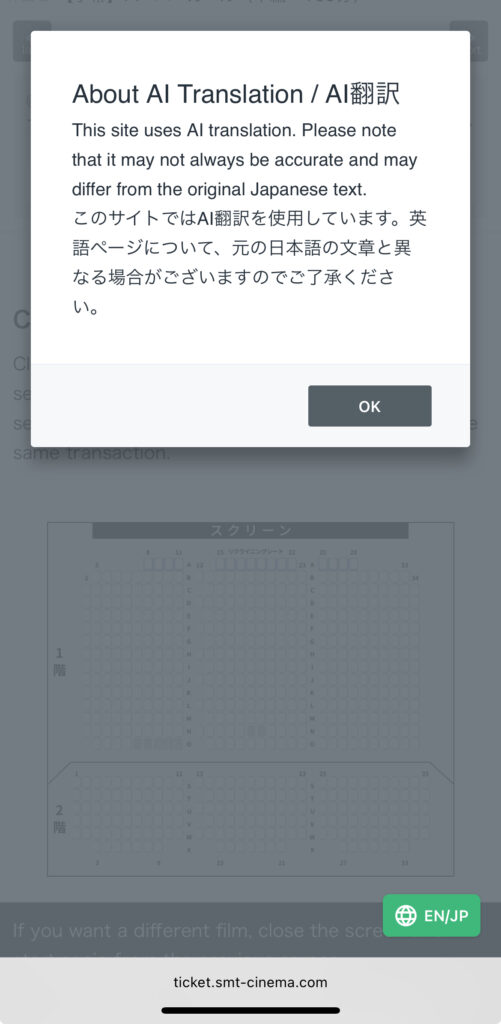
Here, you can switch the booking screen to English by tapping the EN / JP button.
Choose any available seat you’d like to reserve. Available seats are shown in different colors, while unavailable seats are grayed out.
Some theaters also offer premium seating options for an additional fee.
Tip: Popular movies and weekend screenings can sell out quickly, so booking early gives you the best chance of getting your preferred seat.
📷
Step 4 — Continue Without Membership
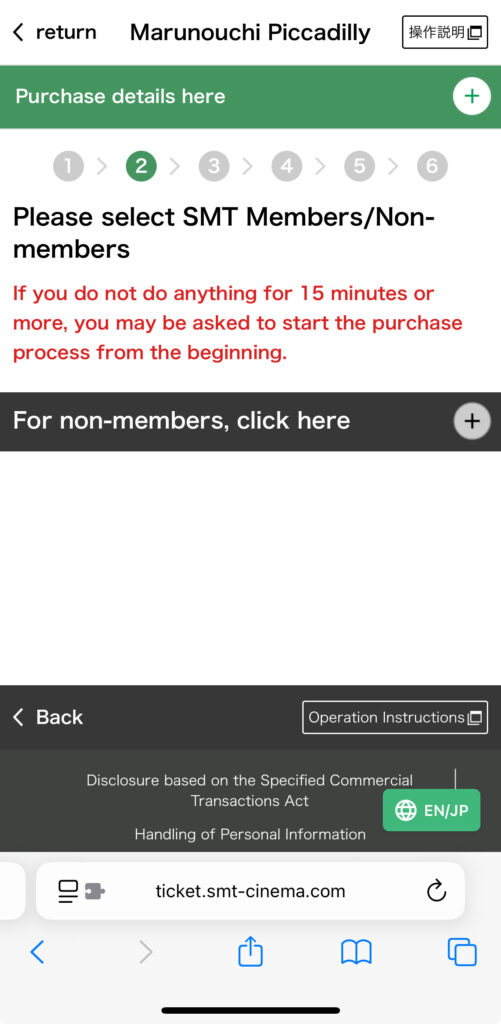
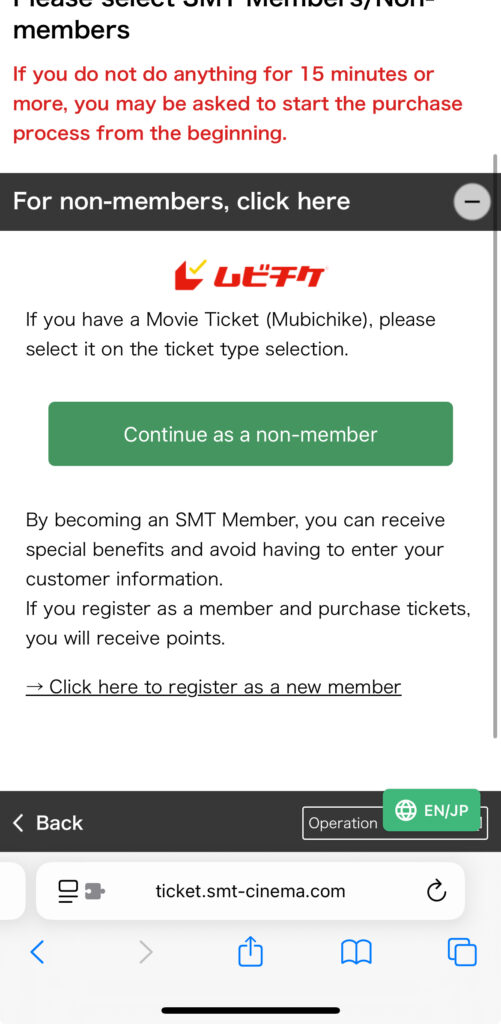
After selecting your seats, you’ll be asked whether you’d like to sign in with an SMT Cinema Members account.
If you don’t have an account, simply click “For non-members, click here” and continue as a guest.
You don’t need to create a membership account to complete your booking.
📷
Tip: SMT Cinema Members can purchase tickets earlier than non-members. However, creating an account isn’t necessary if you’re visiting Japan and only plan to watch a movie once.
Step 5 — Choose Your Ticket Type
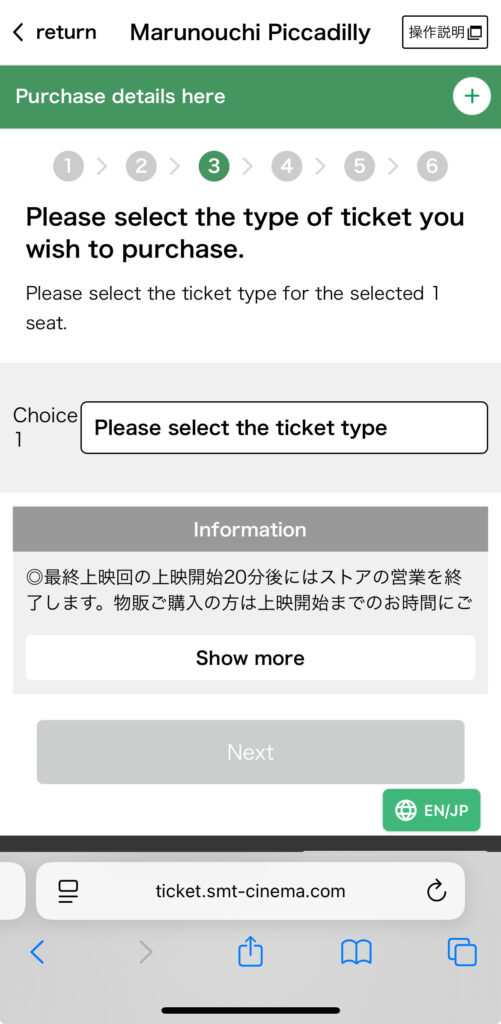
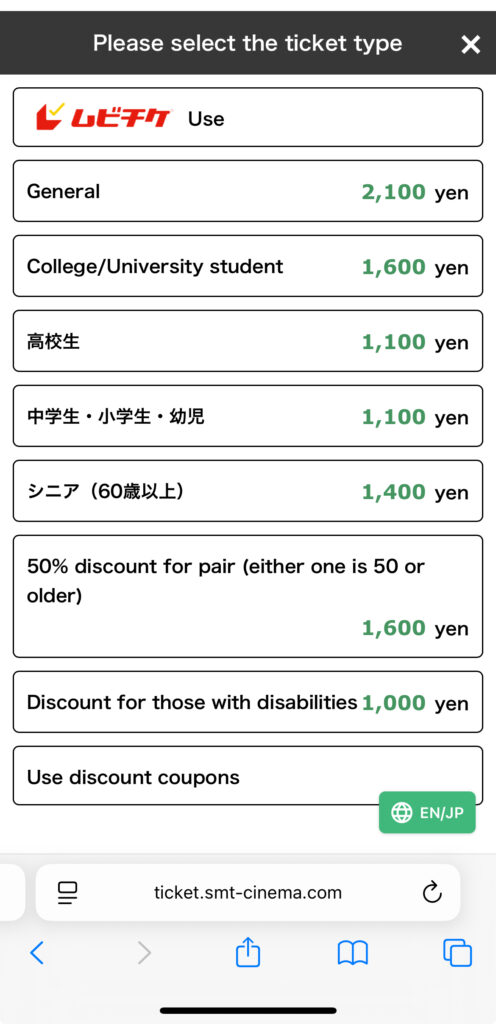
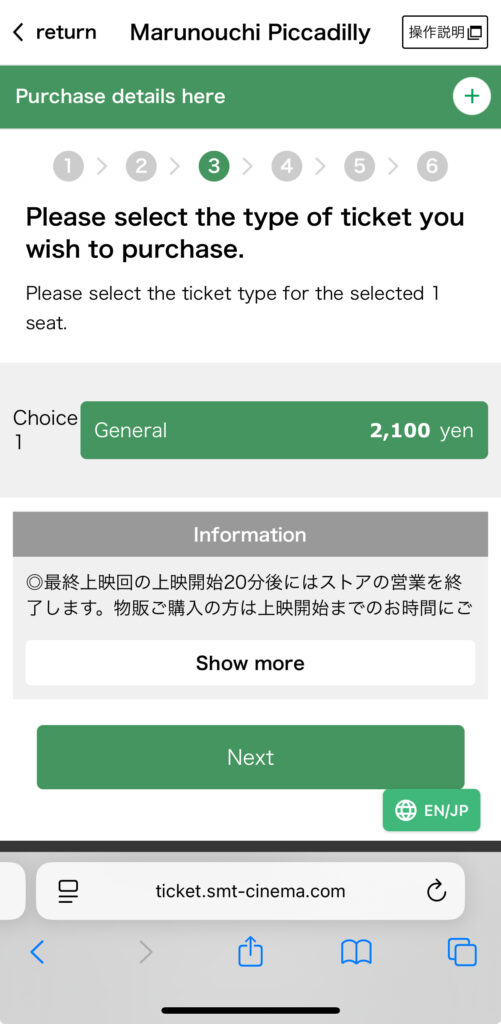
Next, select the ticket type that applies to you.
You’ll see options such as Adult, University Student, High School Student, and MoviTicket in the same ticket list.
If you’re using a MoviTicket, simply select the MoviTicket option and enter your MoviTicket number and PIN when prompted.
Tip: If you’re watching a movie in a premium format such as IMAX, additional charges may apply even when using a MoviTicket.
📷
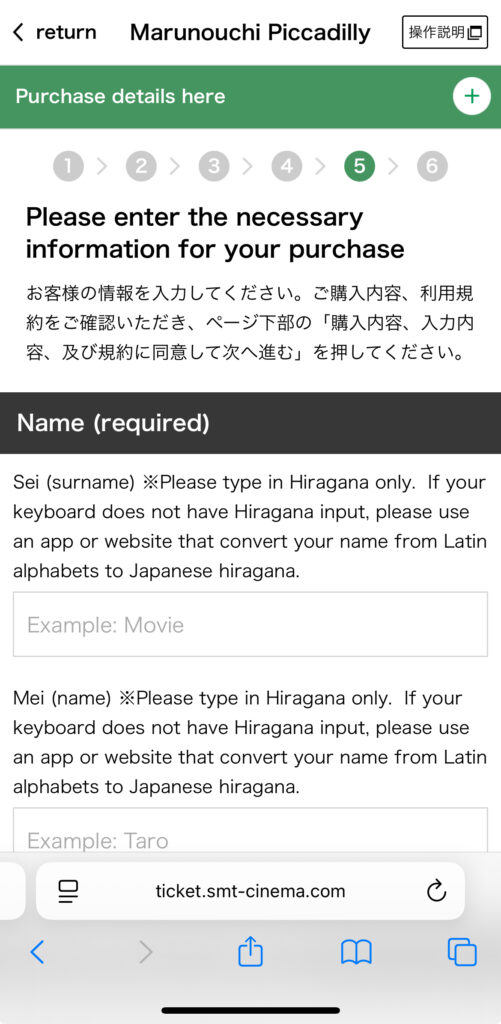
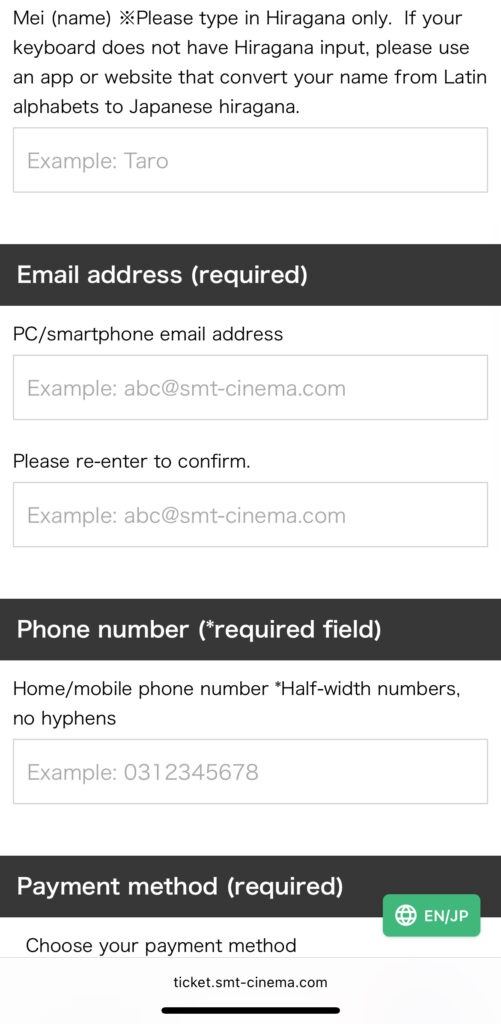
Step 6 — Enter Your Information and Complete Payment
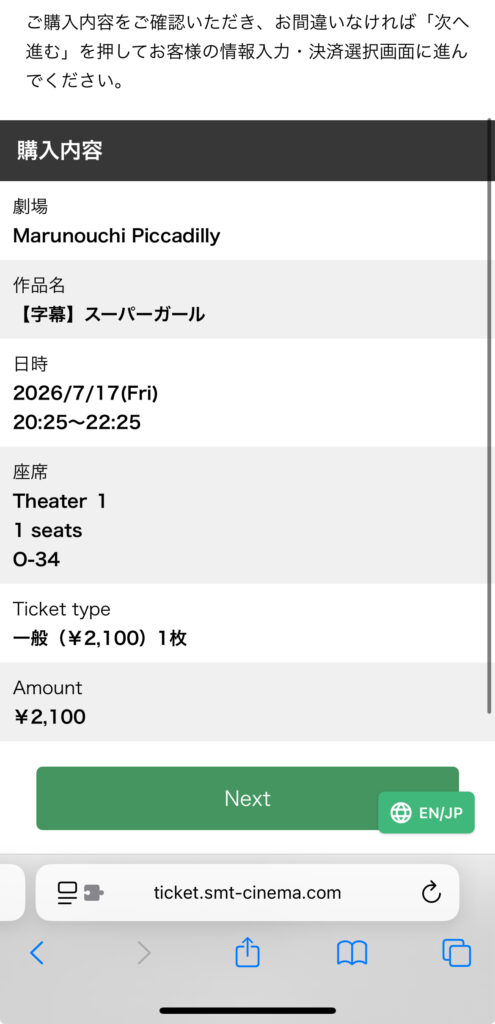
Before completing your purchase, review your booking details and enter your personal information.
You’ll need to provide:
- Full name
- Email address
- Phone number
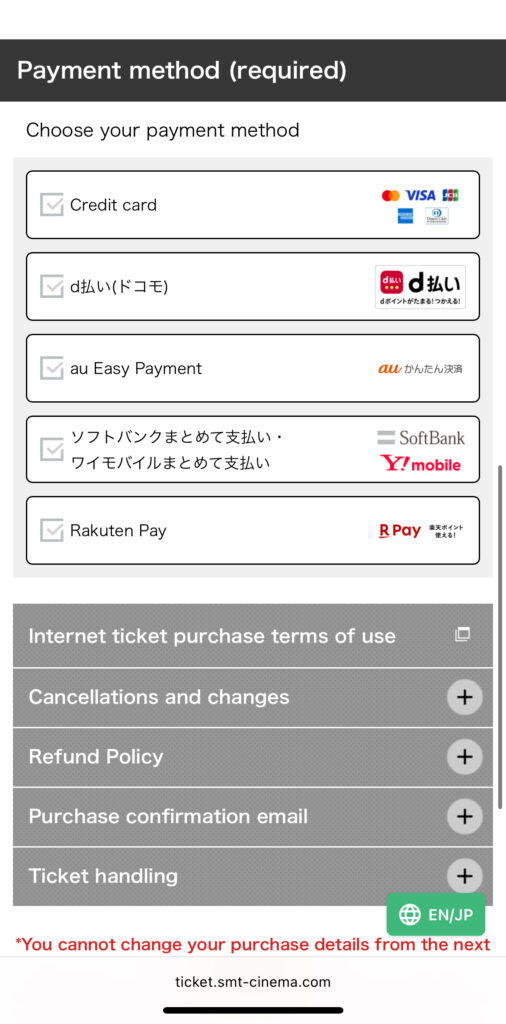
Next, choose your preferred payment method.
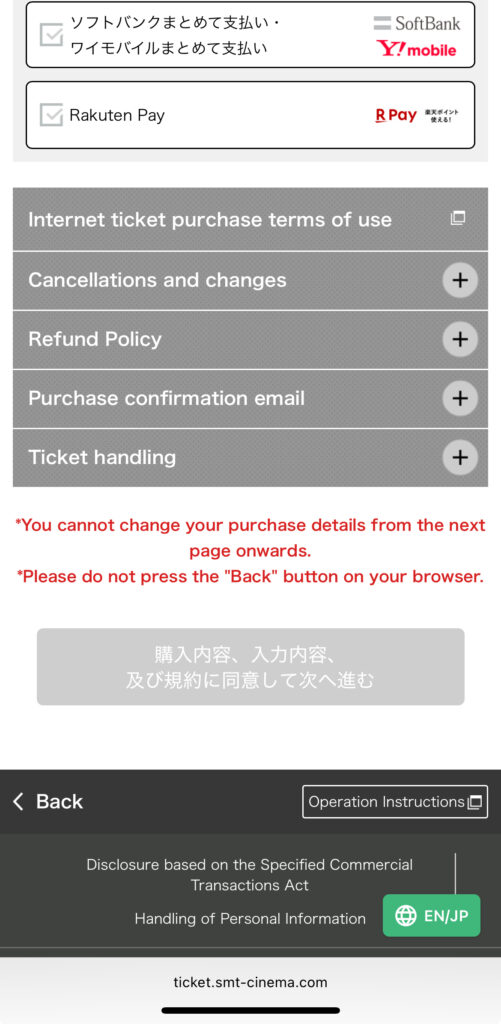
MOVIX & SMT Cinemas accept Visa, Mastercard, American Express, JCB, and Diners Club credit cards. You can also pay using several popular digital payment services, including d Payment, au Kantan Kessai, SoftBank / Y!mobile Carrier Billing, and Rakuten Pay.
Once you’ve confirmed your booking details, complete your payment to finalize your reservation.
Tip: Double-check your theater, movie, showtime, seats, and ticket type before completing your purchase. Tickets generally cannot be changed or cancelled after payment.
📷
How to Receive Your Ticket
Once your booking is complete, you’ll receive a confirmation email containing your booking details.
Depending on the MOVIX or SMT theater you’re visiting, you can enter the theater in one of the following ways:
Option 1 — Use a Mobile Ticket
Some SMT theaters allow you to enter by showing the QR code from your confirmation email on your smartphone.
If your theater supports mobile tickets, you can go directly to the entrance without printing a paper ticket.
Option 2 — Print Your Ticket at the Theater
At other SMT theaters, you’ll need to print your ticket at a self-service ticket machine before entering.
Depending on the theater, you’ll need either:
- Your QR code
- Your Purchase Number and phone number
- Your membership card (for members)
Tip: Check your confirmation email carefully, as it explains how to receive your ticket at your selected theater.
Things to Know Before Booking
When Do Ticket Sales Open?
Non-members can purchase tickets from 9:00 PM, three days before the screening date.
SMT Cinema Members can book even earlier, starting at 5:00 PM, three days before the screening date.
Tip: MOVIX & SMT cinemas open online ticket sales earlier than some other major theater chains in Japan, making it easier to reserve seats for popular movies.
Can I Cancel or Change My Booking?
No. Once your booking is complete, changes and cancellations are generally not allowed.
Before completing your purchase, make sure you’ve selected the correct theater, movie, date, showtime, seats, and ticket type.
⚠️ Tickets cannot usually be refunded or changed unless the screening itself is cancelled.
Can I Enter After the Movie Starts?
Late entry is generally not recommended.
To avoid disturbing other guests, theaters may refuse entry after the main feature has started. Depending on the theater’s situation, you may also be asked to move to a different seat.
Tip: Arriving 15–20 minutes before your movie starts is the safest option.
FAQ
Can tourists book MOVIX tickets online?
Yes. You don’t need to become an SMT Cinema Member to book tickets online.
Do I need a membership account?
No. Simply select “For non-members, click here” to continue your booking as a guest.
Can I use a MoviTicket?
Yes. Select MoviTicket from the ticket type list and enter your MoviTicket number and PIN when prompted.
Can I pay with a foreign credit card?
MOVIX & SMT Cinemas accept major international credit card brands, including Visa, Mastercard, American Express, JCB, and Diners Club.
However, the official website does not clearly state whether overseas-issued cards are supported. If you’re visiting Japan, it’s a good idea to have an alternative payment method available just in case.
Do I need to print my ticket?
It depends on the theater.
Some SMT theaters support mobile tickets, while others require you to print your ticket at a self-service machine before entering.
Your confirmation email will explain which method applies to your selected theater.